The design process has always lived between two worlds: the rough immediacy of a hand-drawn line and the precision of a finished object you can hold. What changes the game is not having more tools, but having the right ones at each stage. The five picks here form a complete creative pipeline, moving from the first mark on paper to a physical object that exists in the world, one you can turn over in your hands, show to a client, or give to a manufacturer with confidence.
What makes this lineup unusual is its range. A fidget-friendly pen sits alongside a crowdfunded filament recycler. A magnetic clipboard shares editorial space with a professional OLED drawing tablet. That breadth is intentional. Great design does not happen at one point in the process; it accumulates across all of them. These are the tools that make every stage worth showing up for, and worth doing well. Each one earns its place at the desk.
1. SPINNX Magnetic Modular Pen
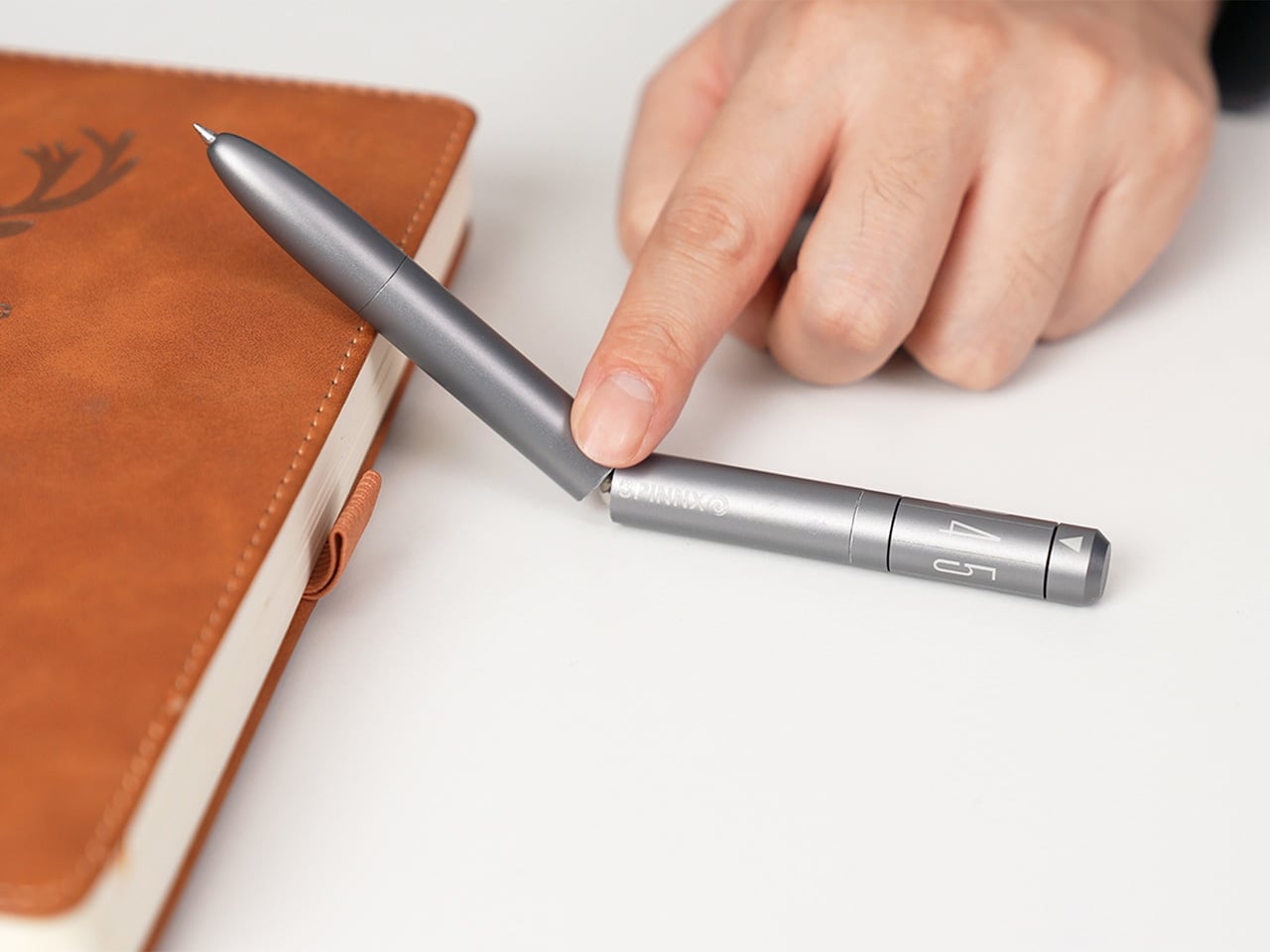
Every designer knows the restless hands that accompany deep thinking – the pen rolling between knuckles, the cap snapping and unsnapping, the absent-minded clicking that somehow keeps ideas moving. SPINNX, built by WEIWIN from aerospace-grade titanium, takes that instinct seriously and turns it into a fully engineered creative tool. The pen separates into three magnetic modules, each delivering a distinct tactile sensation: a crisp snap when the modules connect, a spring-loaded ball click in the middle, and a dice-style spinner top that rotates through rhythmic mechanical detents with ceramic bearing smoothness. With over fifty claimed configurations, the pen offers a whole palette of physical feedback, letting a designer find the specific sensation their brain needs to stay locked in and keep the ideas flowing. When it is time to actually put something on paper, the pen tip deploys through a smooth twist mechanism, and WEIWIN’s proprietary Super Refill offers up to six times the writing life of a standard refill – meaning the tool that sparks the idea is equally capable of capturing it.
For designers who spend long hours at a desk moving between sketching and problem-solving, the SPINNX functions less like a novelty and more like a cognitive companion. The acoustic and tactile response of each magnetic separation was engineered as an intentional product feature, treated with the same design attention as the geometry itself – similar to how luxury car designers obsess over the sound of a closing door. The optional Maglev Pen Stand extends this philosophy further, using magnetic levitation to hold the pen upright as a kinetic desk sculpture, turning even a moment of pause into an engaging physical interaction. Available in four finishes, SPINNX makes a compelling case that the best design tool is one that works with a designer’s restless, creative mind rather than against it.
What We Like
The fidget experience is genuinely intentional – the acoustic response, the weight distribution across modules, the ceramic bearing in the dice spinner – every tactile detail makes it one of the rare tools that genuinely supports the restless, nonlinear way creative thinking actually works.
It earns its place at a designer’s desk as both a sketching tool and a thinking tool and the twist-deploy pen tip and the high-endurance proprietary refill ensure it never compromises on its core function.
What We Dislike
The proprietary refill is a closed-system gamble, which is a real long-term reliability concern for a product positioned as a premium daily carry.
A three-part pen is a three-part losing opportunity – lose one module on a busy studio desk or in a bag, and the entire fidget system feels incomplete.
2. Creality Filament Maker M1 and Shredder R1
The Creality Filament Maker M1 and Shredder R1 sit at the end of the design pipeline and change what the end of the pipeline actually means. The R1 takes failed prints, support structures, and material scraps and breaks them down into reusable fragments. The M1 then takes those fragments or fresh virgin pellets and extrudes them into new filament with precise temperature control, stable extrusion performance, and a consistent diameter output. Every part of this happens on a single desktop system, without sending material waste anywhere else. The loop closes on the desk, which is where design has always worked best.
What makes the M1 and R1 specifically relevant to designers rather than makers alone is the degree of material authorship the system opens up. Custom color blending, scent additives, and texture variations move filament from a commodity you order to a creative variable you control. A studio working on sensory design, branded packaging prototypes, or experimental material research now has a desktop tool that matches that level of ambition. The system currently supports PLA and PETG, with ABS, ASA, and PC compatibility in development. It is available to back on Indiegogo now, with shipping expected in June 2026. For designers who have always wanted to own the full process, the M1 and R1 are the closest that ownership has ever been to a desk.
What We Like
The closed-loop system converts failed prints and material scraps into fresh filament, directly reducing both studio waste and material cost
Custom color and additive blending give designers creative authority over the material itself, not just the form it produces
What We Dislike
Material support is currently limited to PLA and PETG, with broader compatibility still in development
3. Wacom MovinkPad Pro 14
The Wacom MovinkPad Pro 14 is the bridge between a physical sketch and a refined digital file, and it treats that role with genuine seriousness. Built on Android 15 OS, it operates as a fully self-contained creative workstation with no laptop, no cables, and no setup required beyond picking it up. The 14-inch OLED display delivers the color accuracy and contrast that design work actually demands, and the Wacom Pro Pen 3 brings the line quality and pressure sensitivity that feels continuous with the analog tools earlier in the process. It does not feel like a compromise between precision and portability. It feels like both are resolved into a single object.
For designers who move between studio, site, and client-facing environments, the portability argument is real rather than aspirational. Being able to sketch a revision in a meeting room, render a concept on a flight, or present live work from a single device without a cable in sight changes how quickly creative decisions can be made and acted on. It runs on Android 15, which means the software you use needs to be compatible with that ecosystem. For designers whose workflow is already built around compatible applications, that is a non-issue. For those whose toolkit lives entirely in desktop environments, it is worth checking before committing.
What We Like
Android 15 OS makes it a fully standalone device with no laptop dependency, built for designers who work across multiple locations
The 14-inch OLED display delivers the color accuracy and contrast that professional design work requires, not just adequate screen performance
What We Dislike
Android ecosystem compatibility means not all desktop-first professional design software will be available or optimally supported
At the premium price point, it is a significant investment for designers who already own a dedicated drawing setup
4. Bambu Lab A1 Mini Combo
The Bambu Lab A1 Mini Combo is where the design moves off the screen and becomes something you can hold. Its full-auto calibration system removes the manual tuning that used to make 3D printing feel like a separate technical skill set, letting designers focus entirely on what they are making rather than how the machine is behaving. The Combo version adds AMS-powered multi-color material handling, supporting up to four filament colors in a single print run. That capability meaningfully expands what a prototype can communicate, covering not just form but material differentiation, color intent, and spatial relationships between components.
Noise output sits below 49 decibels in silent mode, quiet enough to run in a shared studio without drawing attention to itself. The compact footprint integrates into a desk setup without claiming its own corner of the room, and one-click MakerWorld integration streamlines going from a digital file to a running print without a technical detour. The A1 Mini Combo occupies the specific moment in the design pipeline where intent becomes form, and it handles that transition with the kind of efficiency that makes iteration feel fast rather than laborious. For a designer prototyping regularly, fast iteration is the whole point.
What We Like
Full-auto calibration removes the technical barrier to producing a physical prototype quickly and without manual intervention
Multi-color AMS printing expands what a prototype can communicate well beyond form alone
What We Dislike
Build volume is smaller than full-size Bambu Lab models, which limits the scale of what can be prototyped in a single print run
The AMS hub accessory required to connect additional material units is sold separately, adding to the effective total cost
5. MagBoard Clipboard
The MagBoard Clipboard is what a notebook looks like when a designer strips away everything that gets in the way of thinking. A hardcover body paired with a magnet and lever mechanism binds up to 30 loose sheets of paper with no ruling, no margins, and no fixed format to work around. You add pages when you need them, remove them when you do not, and reorder them entirely when the thinking shifts. That structural neutrality is genuinely rare in stationery, and it turns out to be the most useful quality a tool at this stage of the process can offer.
Its hardcover construction means it works while you are standing. In a client meeting, on a site visit, mid-conversation with a collaborator, wherever the information is, the MagBoard can be there with you. The surface resists water and cleans easily, which matters in the kind of environments where actual work gets done rather than where it is presented. At $45, it sits at a price point that feels considered: low enough to use without treating it like a precious object, high enough to signal that the design itself was taken seriously. It is the kind of tool that disappears into the process, which is exactly what it should do.
What We Like
The magnet and lever mechanism binds up to 30 loose sheets with no imposed format, ruling, or sequence to work around
Hardcover construction makes it fully usable while standing, wherever the work demands you to be
What We Dislike
Thirty sheets exhaust faster than a bound notebook during intensive ideation or research sessions
No integrated storage for pens or accessories, so they travel separately
The Best Design Process Is the One You Can See All the Way Through
What connects these five tools is not a shared product category but a shared philosophy. Each one removes a specific friction from the design process: disorganized color, a rigid notebook format, studio dependency, manual calibration overhead, and disposable materials. Taken together, they describe a workflow as considered as the work it produces. No tool here asks you to compromise on the stage it owns. That consistency across the full pipeline is what makes them work as a set rather than a random assortment.
The best design tools do not make design easier in a way that simplifies it. They make the hard parts worth doing. From the first mark with the Pen Fan to the closed material loop of the Creality M1 and R1, every tool here earns its position in the process. The gap between the first sketch and the finished prototype has always been where the real design work happens. These five tools close it.
The post 5 Best Design Tools That Take You From the First Sketch to the Finished Prototype first appeared on Yanko Design.