
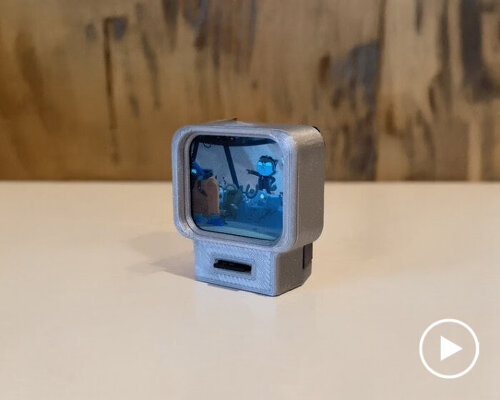
portable tiny TV ‘tinytron’ plays videos using SD card
Meet Tinytron, a portable tiny TV that can play movies using an SD card and stream videos from computers connected to WiFi. Built with a 3D printed case, the miniature device runs on a rechargeable battery and has only one control button. Its main heart lies in the use of the ESP32-S3 chip, which chip handles the display output, WiFi features, and file access. The screen is a 1.69-inch panel fixed directly to the development board, and the device can read MJPEG video files from a microSD card. When it’s not present, it streams video from a computer through WiFi using a web interface, which means the user only needs a browser to set it up (no need to install extra software).
The designer, named Tom, wants to use as few hardware parts as possible for his portable tiny TV called Tinytron, hence the use of only three main materials, namely the ESP32 board, an SD card reader, and a battery. The device uses one physical button for all commands. A short press pauses or resumes playback. A double press plays the next file. A long press turns the device on or off. The system also monitors the battery voltage and shows the value on the screen and in the web interface. When the portable tiny TV Tinytrone starts, it switches to SD Card Mode and looks for MJPEG .avi files stored on the card. When files are found, the device plays them in alphabetical order.
all images courtesy of Tom via Youtube and Github
How to make your own miniature television
For those who want to build the miniature device, the designer documents the process in his post, including the many design influences he draws from to create his gadget. The assembly begins with the SD card breakout board. A six-pin header is soldered to the board, and the pins on the underside are trimmed. This step creates the main connection point for the microSD card system. The next task is the preparation of the SPI cable that comes with the ESP32 development board. The cable contains several wires, but not all of them are needed for this project (the instructions detailed in the post list which wires stay and which ones must be cut). The remaining wires link power, ground, and data lines between the ESP32 board and the microSD reader. Electrical tape is wrapped around the male pins to form a simple connector that can be removed when needed.
The instructions warn that reversing the connector would swap power and ground, which would damage the hardware. After the wiring step, the bezel is glued to the front case piece. The method uses tape as a hinge to keep the alignment steady before the glue sets. The rest of the case connects with snap-fit parts, so it does not require tools. The display is inserted first, with attention to the position of the push button and the USB-C port. The SPI cable must be plugged into the SD board with the blue wire on the left. When closing the back case, care is needed to avoid pressing the battery, which could be unsafe if damaged. Then, the case can be reopened through a small side notch with a flat tool. So far, the maker has only uploaded the video of assembling the portably tiny TV Tinytron, and he has long commented on his plans to make a demo video to show how the device works.
USB port at the top of the portable tiny TV, Tinytron
the case connects with snap-fit parts
the cable contains several wires, but not all of them are needed for this project
side view of the portable tiny TV, Tinytron
the miniature device can play videos using the SD card
the shell of the device is 3D printed
project info:
name: Tinytron
design: Tom
instructions: here
The post making your own portable tiny TV that plays movies and streams videos from computers appeared first on designboom | architecture & design magazine.